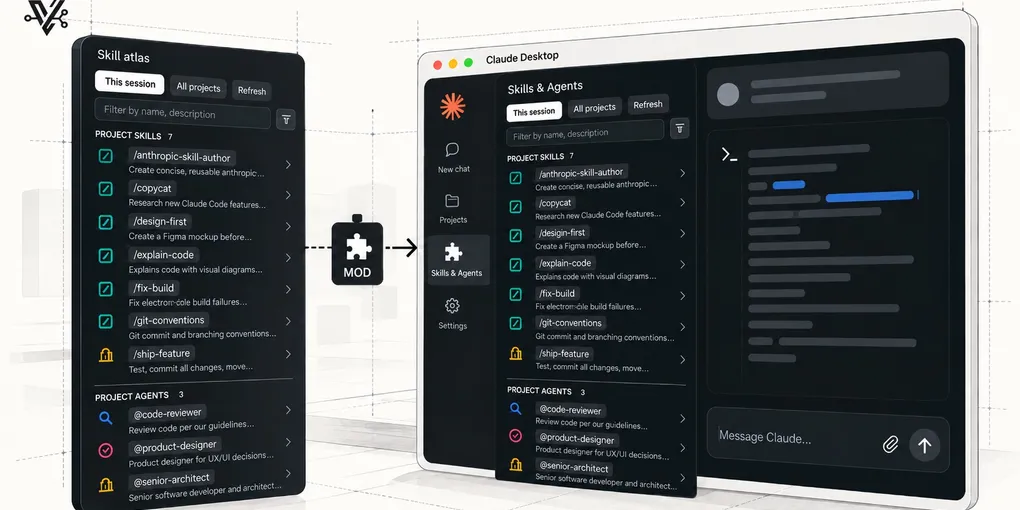
Porting my homegrown GUI to a Claude Desktop mod
TL;DR: I used to run Claude Code through coide, a GUI I built myself. When I switched to Claude Desktop’s Code tab, the feature I missed most was a boring one: a panel showing every skill and subagent I have, and where each one lives. Claude Desktop supports mods now, so I rebuilt that panel in a day as skill-atlas: a live pane, one .tsx file, installed with a symlink. This post is how a mod is put together, plus the four gotchas I hit.
For most of this year, my daily Claude Code driver was a GUI I built myself. coide was my first real Claude Code project: an Electron app wrapping the CLI, with the panels I wished the terminal had. Then Claude Desktop’s Code tab got good enough that maintaining my own wrapper stopped making sense, and I switched.
Mostly that was an upgrade. But there was one coide panel I kept reaching for and not finding: a sidebar that listed every skill and subagent available to the session, with descriptions, so I never had to remember whether review-adoption was a global skill or a project one, or fish for an agent’s name in the slash autocomplete.
Here’s the thing about retiring a homegrown tool: the code dies, but the features were never the point. They were a spec, written by months of daily use, for what the official tool would eventually need. So when Claude Desktop shipped support for mods (plugins that can draw panes inside the app), I didn’t mourn coide. I opened its repo and started porting.
The first port is skill-atlas, and it took a day. It’s open source and you can install it with a symlink. The rest of this post is how a mod is actually put together, and the four gotchas that cost me most of that day.
What skill-atlas does
It’s a pane that lives next to the chat, with two views:
- This session shows everything the current session can use: project skills and agents from
<project>/.claude/, globals from~/.claude/, and skills shipped by installed plugins (read frominstalled_plugins.json). Each entry carries the name and description parsed from its frontmatter, and globals and plugin skills get a scope badge. When two entries share a name, the project one wins, then the global one. - All projects scans the folder your repos live in for
.claude/{skills,agents}:~/Projectsif you have one, otherwise the folder that holds the project the session is open in. It goes up to three levels deep, so grouping folders like<client>/<repo>work, and it skips hidden and build folders likenode_modules. Results are grouped by project, with the machine-wide set from~/.claudepinned on top. It’s a map of where every skill lives across your repos.
A filter input narrows both views as you type, and skills and agents get distinct icons so you can tell them apart at a glance. Clicking an entry expands it to show the full description and the path of the file behind it. The whole mod is read-only.
Why mods are worth a look
Most Claude Code customization so far has lived around the conversation: settings, hooks that shell out to scripts, skills, subagents. A mod reaches into the app itself. It can draw a pane next to the chat, put a band above the prompt, show a toast, register a slash command, and sit in the middle of events like a prompt being submitted or a tool being called. The two examples bundled with the plugin-authoring skill show the range well: one is a live pane listing every tool call in the session, the other puts “Last turn: 42s, 7 tool calls” above the prompt and toasts you when a turn runs past two minutes.
What surprised me is how little ceremony that takes. A mod is a folder with a manifest and one TypeScript module, edits hot-reload into the session you’re working in, and the whole thing can be tested headlessly. If there’s a panel you wish the app had, the distance between wishing for it and having it is now about a day.
Anatomy of a mod
A mod is a Claude Code plugin with a hooks module. skill-atlas is three files that matter:
.claude-plugin/plugin.json, the manifest: name, version, and atypesfield pointing at your state contract (more on that below).hooks/hooks.json, a single line:{ "modules": ["./register.tsx"] }.hooks/register.tsx, the entire mod: scanners, state, a slash command, and the pane renderer.
The module exports a register function that subscribes to events. Three subscriptions cover the whole thing:
export const register: Register = on => {
  on('session.start', async ($, e, next) => {
    await $.command.register({
      name: 'skill-atlas',
      description: 'Show every skill and subagent (this session + all projects) in a pane',
    })
    void $.ui.open({ id: PANE, title: 'Skill atlas' })
    void rescan($)
    return next(e)
  })

  on('command.run', { command: 'skill-atlas' }, async $ => {
    await $.ui.open({ id: PANE, title: 'Skill atlas' })
    void rescan($)
    return { text: 'Skill atlas pane opened.' }
  })

  on('ui.render', { component: 'Pane', requestId: PANE }, async ($, e) => {
    const { Box, Text, Button, Input } = $.ui.resolve(e)
    // ...return JSX built from state
  })
}
$ is the engine interface, and it’s how the mod touches the world: $.fs.list and $.fs.read to scan skill folders, $.state for persistence, $.ui for the pane, $.command.register for the slash command. The ui.render handler is a pure function from state to JSX; every state change re-renders. If you’ve written React, the model is instantly familiar. If you’ve written an Electron app that does the same job, like I had, the striking part is how much infrastructure you don’t write: no window management, no IPC, no file watcher. The scanning logic I ported from coide landed almost unchanged; everything around it evaporated.
State goes through $.state with typed refs. A ref is a literal object:
const viewRef = { plugin: 'skill-atlas', key: 'view' } as const

const { value: view = 'session' } = await $.state.get(viewRef)
await $.state.set(viewRef, 'projects')
The ref’s keys and value types are checked against a contract you declare in types/index.d.ts (the file plugin.json’s types field points at), by augmenting the engine’s PluginState interface:
declare module 'claude-code' {
  interface PluginState {
    'skill-atlas': {
      view: 'session' | 'projects'
      filter: string
      expanded: string[]
      session: AtlasGroup[]
      projects: ProjectGroup[]
      scannedAt: number
    }
  }
}
A typo’d key or a wrongly-typed value is then a compile error. The bundled plugin-authoring example wraps the same calls in atom, read, and update helpers. Those are newer, so they need a recent CLI to validate (gotcha 2).
Four gotchas the docs won’t tell you
1. Button is picky about its children
Button accepts strings and Text elements as children. Nothing else. Wrap a Box inside one to lay out a label with a description underneath, and the engine refuses to draw the pane at all (<Button> holds strings and Text, not <Box>). claude plugin validate doesn’t catch it; the test harness and the live app do. The layout that works puts the description next to the button, not inside it:
<Box flexDirection="column">
  <Button key={address} onPress={toggle}>
    {`/${one.name}`}
    <Text dimColor size="caption">{` ${one.scope}`}</Text>
  </Button>
  <Box paddingLeft={2}>
    <Text dimColor size="caption" wrap="wrap">{one.description}</Text>
  </Box>
</Box>
2. You may have two CLIs, and they disagree
My PATH had Claude Code 2.1.260, which has claude plugin validate but no claude plugin test. Its validator also rejects the bundled example’s state helpers, because it won’t follow $ into a function imported from another module. The desktop app embeds its own, newer binary (2.1.299 and up) that has both commands and accepts the example as written. On macOS it lives at:
~/Library/Application Support/Claude/claude-code/<version>/<hash>/claude.app/Contents/MacOS/claudeIf a subcommand from the docs is missing, or an official example fails validation, check which binary you’re talking to before concluding the feature doesn’t exist or the example is broken. I lost twenty minutes to the first conclusion.
3. Tests mock the engine with hooks, not values
Mods are testable headlessly via claude-code/testing: mount the pane on a fake engine, press buttons, assert on what rendered. The part that tripped me up is the mock shape. You don’t hand the fake filesystem a value; you subscribe to the engine’s own events and answer each one with { value } or { deny }, the same envelope the real engine uses:
mock.env(on, { HOME })
on('session.root', () => ({ value: ROOT }))
on('fs.read', (_$, e) => {
  const text = FILES[e.path]
  return text === undefined ? { deny: `ENOENT: ${e.path}` } : { value: text }
})
Then the test drives the UI like a user would:
const ui = await $.ui.mount({ ...PANE, surface: 'desktop' })
await ui.press({ key: 'refresh' })
expect(await ui.find({ key: 's:Project skills:skill:deploy' })).toBeDefined()
skill-atlas’s one test covers scanning, the project-over-global dedupe, expanding an entry, filtering, and the cross-project view (nested folders included), against a filesystem that exists only in the test file. For a UI that reads a dozen directories, that’s a lot of confidence per line.
4. Installation is a symlink, and hot-reload comes free
No marketplace needed for your own machine. Anything in ~/.claude/skills/ auto-loads as a plugin on every new session, so installation is:
git clone https://github.com/vicmaster/skill-atlas.git
ln -s "$(pwd)/skill-atlas" ~/.claude/skills/skill-atlas
It loads as skill-atlas@skills-dir, and the folder is watched: save a file and live sessions reload the mod. That turns development into a tight loop where the pane you’re building sits beside the conversation you’re building it with.
One expected oddity while iterating that way: right after a save, clicks on the pane can land on the previous render and get dropped (the log says ui_press not handled). Each reload swaps the mod out from under the drawn UI, so a click in that window hits a frame that no longer has an owner. Harmless, but if a button “stops working” mid-development, click again before you debug anything.
What I’d tell past-me
- A retired side project is a spec, not a loss. coide’s panel survived as a feature list I could port in minutes. Months of daily use are what made the one-day rebuild possible, because I already knew exactly what to build.
- Check which binary you’re talking to. My PATH had an older CLI than the app, which made a real subcommand look missing and a working example look broken.
- Start read-only. A pane that only reads the filesystem is a mod you can ship the same day, because the worst it can do is show you something wrong. Write operations are where the design work starts, and they can wait for v2.
skill-atlas is at github.com/vicmaster/skill-atlas, open source (MIT), v0.5.2. If you’ve got a dead homegrown tool sitting in a repo somewhere, it might be a mod backlog too.