framesmith 1.9: built for product screens
framesmith 1.9.0 is out, and it’s the release that takes product screens seriously.
Quick context on where it came from: I spent a session designing a real financial dashboard in framesmith — app shell, a 17-row results table, a 4-series pace-to-goal chart. That one sitting filed eight issues, and the theme was unmistakable. framesmith was tuned for marketing pages. Hero sections, pricing grids, landing pages — those it handled well. Dense product UI is where it kept fighting me, and product UI is where design tooling actually earns its keep.
Here’s what shipped.
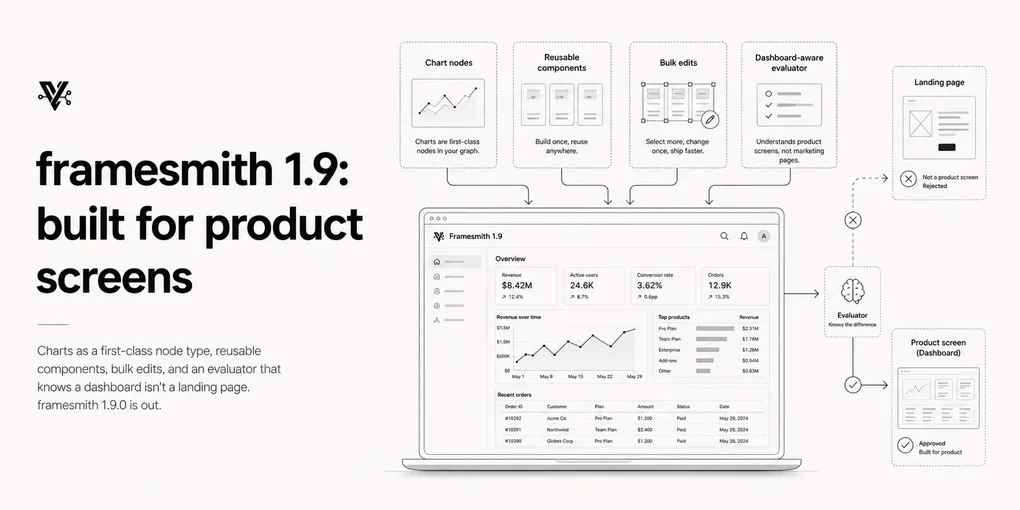
Charts are a node type
Previously, drawing a chart meant hand-computing every coordinate into SVG path strings, and once drawn, multiple series could only be told apart by colour. In that dashboard session I ended up cutting the chart entirely — it wasn’t worth the effort. Now it’s a node:
{ type: "chart", kind: "line",
  series: [{ data, stroke, strokeDasharray, area, points }] }
The node does the value→coordinate math. kind takes line or bar. You get multi-series on a shared scale, domains inferred from the data, dashed strokes for projected versus solid for actual, and gridlines and tick labels as opt-in props.
The practical difference: that 4-series chart is now a single node, and changing a data point is a one-prop edit instead of recomputing a path string. The built-in dashboard pattern ships with a real chart instead of a placeholder box.
Product furniture renders natively
Per-side borders are in — borderTop: { width: 1, color: "$border" } — which is what table row rules and accent edges actually need. No more gap: 1 background-bleed hacks that fight the spacing linter.
Dashed and dotted styles now work on both borders and SVG paths, so the forecast/draft/placeholder conventions you’d expect in a product screen are expressible directly.
The evaluator knows what genre the screen is
This was the sharpest issue from that session: the evaluator scored the dashboard’s own revenue figures as fabricated data. Fifty-three flags, the category zeroed out. Because a financial dashboard has numbers in it, the presentation bar from the 1.7 quality gate was unreachable by construction — no amount of polishing could clear it.
1.9 adds genre calibration. Set genre: "dashboard" and a data-dense screen’s realistic figures stop flagging as fabricated, while marketing pages keep the full anti-slop treatment. The heuristic wasn’t wrong to be suspicious of invented numbers — agent-generated landing pages are full of fake stats. It was wrong to assume every screen is a landing page.
Deliberately dense type scales pin the same way. Declaring 14/13/12/11 in your typography tokens — matching an existing app — is itself the intentionality signal, and the evaluator stops second-guessing it.
Reuse instead of rebuild
create_component promotes any subtree you’ve already built into a reusable component, render-identically. That also gives the evaluator’s long-standing “no component instances found” advisory something actionable to point at.
copy_nodes carries subtrees and their component definitions across canvases. Build the app shell once, stamp it onto 15 screens, override the active nav item per screen. That’s the workflow that makes a multi-screen product design tractable.
Authoring at product scale
Three tools aimed at the friction of working on big canvases:
find_nodeslocates nodes by property, text, or name — “which node holds $1.52M?” — and returns a readable path per match. No more editing the wrong node because two ids looked alike.replace_matching_propertiesapplies one change to every matching node. The 68-operation table-width edit from that session collapses to a single call.canvas_autofix apply: truewrites every mechanical fix in one pass, array-form padding included, instead of handing you a list to apply yourself.
Fonts stopped lying
fontFamily: "mono" now renders monospaced via CSS generic pass-through, instead of silently falling back to serif. The family label you pass to set_fonts is the family that actually gets registered. And batch_design warns about unservable font names in the same call, rather than three renders later when you’re wondering why everything looks off.
Where the edges still are
genre is a hint you supply, not something framesmith infers — a mislabeled screen gets the wrong calibration. And charts cover line and bar; if you need scatter, stacked, or dual-axis, you’re still hand-rolling that one.
Get it
npm i -g framesmith@1.9.0 # or just: npx framesmithNo breaking changes — existing canvases and tool calls work unchanged. Restart a running MCP server to pick up the new node type and tools.
framesmith is open source (MIT), renders to plain HTML/CSS, stores designs as open JSON you own in your repo, and works with any MCP-compatible client.