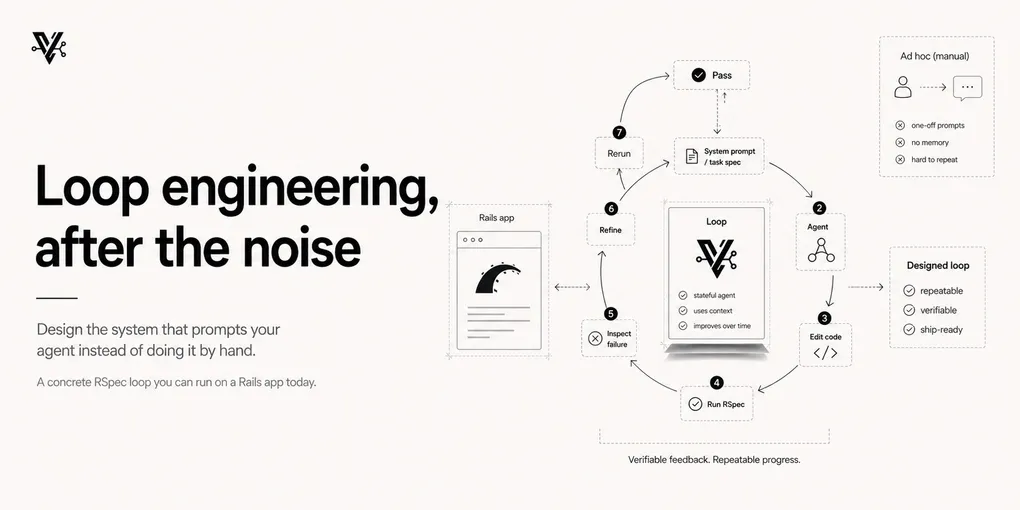
Loop engineering, after the noise
Last month I kicked off a script against a failing spec in Forge — MagmaLabs’ Virtual Employee Platform, a Rails 8 app — and walked away to get coffee. By the time I came back, the spec was green and there was a commit waiting for my review. I hadn’t typed a single prompt. I’d written a loop, and the loop did the prompting.
A couple of weeks ago “loop engineering” went through my feed like a weather front. Same idea, forty rewrites, a lot of carousels that explained the concept and stopped exactly where it got useful. I started a post during that week and didn’t publish it — piling another voice onto that wasn’t worth anyone’s time. So I waited for it to go quiet, because I wanted to see what I still believed once the dopamine wore off. This is that: not the hype recap, the part that held up.
And the idea underneath the noise is real. For the last two years, working with AI coding agents was a manual, turn-by-turn thing: you write a prompt, the agent generates code, you review, you prompt again. You were the operator holding the tool, steering every tick. Loop engineering moves you up a level. You stop being the thing that prompts the agent, and you start building the thing that prompts the agent for you.
That much the hype got right, and the people who said it first said it well. Peter Steinberger put it plainly: “You shouldn’t be prompting coding agents anymore. You should be designing loops that prompt your agents.” Boris Cherny, who runs Claude Code at Anthropic, said the same thing about his own job — it’s no longer to prompt Claude, it’s to write the loops that figure out what to do.
Where most of the noise stopped short was the part that actually decides whether a loop works. So that’s where this post spends its time — with a Rails example you can steal this week.
What an agentic loop actually is
Think of a loop as a cron job with a decision-maker inside.
A normal cron job runs a fixed script. It does the same thing every time, whether or not it makes sense. An agentic loop runs a model on every tick: it looks at the current state, decides what to do next, executes it, checks whether it worked, and decides whether to keep going. You write the intent and the stopping behavior. The loop handles the prompting.
The whole game is replacing yourself as the person in the chair. And once you frame it that way, the design questions get sharper: what’s the goal, how does it know it’s done, and what stops it from doing something stupid?
The anatomy, minus the buzzwords
A real loop isn’t a while true with an API call inside. The pieces that make it survive contact with production:
- A trigger — what starts it. A cron job, a GitHub Action, a failing CI run, a webhook. Discovery and triage happen on their own and land in an inbox instead of waiting for you to check.
- Isolation — git worktrees, so parallel agents don’t overwrite each other’s files. Two agents on the same branch is two engineers force-pushing without talking. Don’t.
- Skills — codified project knowledge (a
SKILL.md, aCLAUDE.md) so the agent doesn’t re-derive your architecture from scratch every run. - Connectors — the agent’s hands. Reading the issue tracker, hitting staging, dropping a message in Slack.
- Separate maker and checker — the agent that writes the code is not the agent that grades it. Models are notoriously generous when marking their own homework.
- State — a Markdown file, a Linear board, anything persistent. Models forget everything between runs, so the loop needs a memory of what’s been tried.
You don’t need all six on day one. The two that matter most are the stop condition and the guardrails. Everything else is plumbing you add as the loop earns your trust.
The stop condition is the real product
Here’s the part people skip, and it’s the part that decides whether your loop is useful or just expensive: the verification function is the loop’s specification.
Give an agent a vague goal — “improve the codebase” — and it wanders. It’ll churn through iterations producing work nobody can verify, because it can’t verify it either. There’s no edge to push against.
Give it a sharp stop — “this spec must pass, run it until exit 0” — and the loop gets efficient, because it knows exactly when its job is done. The reported numbers back this up: loops with sharp stop conditions ran around 31% faster and 7% cheaper in benchmarks, simply because they weren’t guessing about completion.
A Rails app is a gift here, because you already have the sharpest stop condition there is sitting in your repo: the test suite. bundle exec rspec either exits 0 or it doesn’t. That’s not a vibe. That’s a verifiable boolean, and a verifiable boolean is the only thing a loop can safely run against unattended.
A loop you can run on a Rails app today
Let me make this concrete. Here’s the actual shape of what I ran against that Forge spec — a headless Claude Code loop with a sharp stop, a max-iteration cap, and no-progress detection.
#!/usr/bin/env bash
set -euo pipefail

TARGET="spec/services/invoice_generator_spec.rb"
MAX_ITER=5
last_diff=""

for i in $(seq 1 "$MAX_ITER"); do
  echo "── Iteration $i/$MAX_ITER ──"

  # SHARP STOP: the spec is green → we're done.
  if bundle exec rspec "$TARGET" --format progress; then
    echo "✅ Green. Stopping."
    exit 0
  fi

  # Capture the failure so the agent has something to work from.
  failure="$(bundle exec rspec "$TARGET" 2>&1 | tail -n 40)"

  # Hand it to the agent in headless mode, scoped to just what it needs.
  claude -p "The spec $TARGET is failing:

$failure

Fix the implementation — not the test — so it passes.
Run the spec yourself to confirm before you finish." \
    --allowedTools "Edit" "Bash(bundle exec rspec*)" \
    --max-turns 30

  # NO-PROGRESS DETECTION: if the agent changed nothing, bail.
  current_diff="$(git diff)"
  if [ "$current_diff" = "$last_diff" ]; then
    echo "⚠️  No change since last iteration. Stuck. Bailing for a human."
    exit 2
  fi
  last_diff="$current_diff"
done

echo "❌ Still red after $MAX_ITER iterations."
exit 1
Walk through what each part is doing, because every line is a design decision:
- The sharp stop is the
if bundle exec rspecat the top. The loop checks for green first, every iteration. The spec passing is the spec — the literal, executable definition of done. No prose goal, no “looks good to me.” claude -pis headless mode. It runs the agent non-interactively and returns. That’s what makes it loopable — no human in the chat.--allowedToolsis a guardrail, not a convenience. The agent can edit files and run rspec. It can’t run arbitrary shell, can’t touch the database, can’trmanything. You’re handing it the smallest key that opens the one door it needs.- “Fix the implementation, not the test” matters more than it looks. Without it, the cheapest path to green is deleting the assertion. Models take cheap paths. Close the door explicitly.
MAX_ITERis the infinite-loop backstop. Five tries, then it stops and gets a human. No runaway weekend.- No-progress detection catches the subtler failure: the agent “working” but producing the same diff over and over, burning tokens while standing still.
Run that, and you’ve got a loop that prompts the agent on every tick, knows exactly when to quit, and can’t do much damage if it goes sideways. That’s loop engineering on a Rails app, and it fits in 30 lines.
The cost is in the checking, not the loop
A worry I hear a lot: “won’t an autonomous loop just incinerate tokens?”
Not the way people think. A loop’s cost tracks its verification surface, not the size of your codebase. It’s expensive in proportion to how much you ask it to check, not how much code exists around it.
Concretely: generating a single-file service class with exhaustive edge-case specs can cost more tokens than generating a multi-file CLI module, because every edge case is another write-run-check round trip. In the Rails loop above, the cost is dominated by how many times rspec has to run and how much output it has to read each time — not by how big Forge is. Want a cheaper loop? Narrow the spec, not the repo.
Guardrails, because the keys are real now
When you hand a loop the keys, the blast radius scales with the autonomy. “Agent-inflicted damage” isn’t a hypothetical — there are real stories of autonomous agents dropping production databases, running rm -rf against the wrong directory, and burning thousands in API spend over a quiet weekend.
The non-negotiables before any loop runs unattended:
- Max iteration limits. Always. The loop above caps at five. Pick a number; never run uncapped.
- No-progress detection. Halt if the state stops changing. A loop repeating the same tool call with no effect is stuck, not working.
- Least privilege. Scope
--allowedToolsto the minimum. The agent should never hold more permission than the task needs — and never more than you’d hand a junior engineer on day one. - Isolation for anything that writes. Worktrees or a sandbox, so a bad run is throwaway, not a recovery operation.
These aren’t paranoia. They’re the difference between a loop you can leave running and a loop you have to babysit — and a loop you have to babysit is just manual prompting with extra steps.
Stay the engineer
Loop engineering changes the job. It doesn’t delete it.
Here’s the trap to watch: the faster a loop ships code you didn’t write, the faster your understanding of your own codebase rots. Call it comprehension debt. You can wake up owning a system that technically works and that you can no longer reason about — which is a worse place to be than a smaller codebase you actually understand.
So the work moves, it doesn’t disappear. Your job is no longer to press “go” or hand-type prompts. It’s to define the boundaries, write the tests that are the stop condition, build the skills, and design the loop. On a Rails app that starts beautifully small: a failing spec, a capped loop, a scoped set of tools. Get that one working, watch it, learn where it lies to you, then widen.
Build the loop. But build it like someone who fully intends to stay the engineer.